Groove
The house pump, in time and with no routing.
KNOB: DUCK
WHAT IT DOES
PixelDuck creates the classic house pump with one knob, with no sidechain, no attack, no release and no ratio. It locks to your DAW's tempo on its own. If you prefer, it can also follow a real kick through the sidechain input, or turn into a tempo-synced tremolo.
WHAT IT'S FOR
- The classic house and EDM pump on pads, basses and chords.
- Making room for the kick in the bass or the mix.
- Tempo-synced tremolo (TREMOLO mode).
- Sidechain compression against a real kick (SC).
- Nervous groove with short subdivisions (1/8, 1/16).
HEAR IT
AUDIO ON THE WAY
Soon you'll be able to hear PixelDuck before and after, with real audio.
WHAT THE SCREEN SHOWS
- DUCK PUMP scene: a little car with the chibi climbs mountains. The terrain is the real gain history: each beat leaves a mountain with the pump's exact shape (a wall on the drop, a peak, a slope on the recovery).
- GR meter: the real reduction in dB (0 to -30).
- Status bubble: CRUISE, ROLLING, CLIMBING, STEEP!, SUMMIT!
QUICK TIPS
- 11/4 is the classic house pump; 1/8 or 1/16 give a more nervous groove.
- 2To follow an irregular kick, turn on SC and send the kick to the plugin's sidechain input from your DAW.
- 3Leave ATK on AUTO unless the attack sounds clicky (raise it) or too soft (lower it).
KNOB: DUCK


Single knob: Duck (0-100%). The depth and shape of the pump, from subtle to extreme (almost a gate). At 0% the signal passes untouched. In TREMOLO mode it's the tremolo depth.
ADVANCED MODEControls, menus and parameters, for when you want to go past the knob.
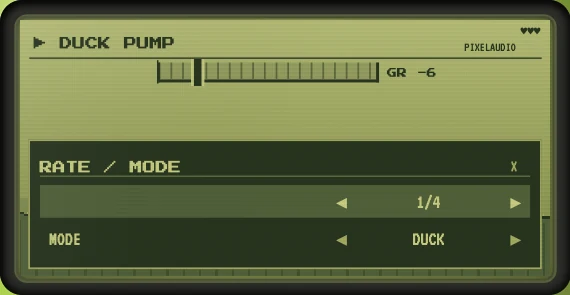
| RATE button | RATE / MODE panel. Tempo subdivision row: 1/1, 1/2, 1/2T, 1/2., 1/4 (default), 1/4T, 1/4., 1/8, 1/8T, 1/8., 1/16, 1/16T, 1/16., 1/32. MODE row: DUCK (the pump, default) or TREMOLO (pure sine in time). |
|---|---|
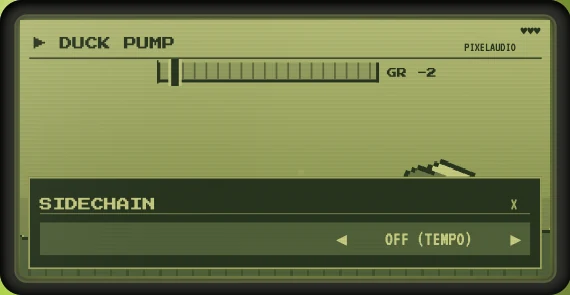
| SC button | SIDECHAIN panel: OFF (TEMPO) (default, the pattern follows the host tempo) or ON (the gain follows the sidechain input level). With no sidechain connected it falls back to the tempo pattern. When ON, the subdivision row dims because it has no effect. |
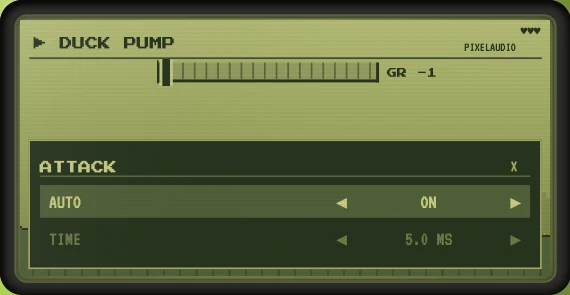
| ATK button | ATTACK panel. AUTO row (ON by default: each mode's approved attack). TIME row (0.1-100 ms): moving it turns AUTO off on its own. The button shows AUTO or the time in ms. |
▶ FREE TRIAL · 14 DAYS
The PixelDuck trial isn't out yet. Leave your email and we'll write the day it ships, with the download link.
By continuing you accept the Terms and the Privacy Policy (in Spanish).
We only use your email to tell you about the launch.
Want a heads-up when the trial ships? Drop your email below.