Space
Reverb and tempo delay, from dry to the horizon.
KNOB: SPACE
WHAT IT DOES
PixelSpace adds depth and ambience to vocals or instruments with one knob: a reverb and a tempo-synced delay in the same plugin. It goes from dry to a big, enveloping space, always musical. The delay syncs to your DAW's tempo on its own, and if you want to shape the sound, the screen has an 8-band EQ for the effect.
WHAT IT'S FOR
- Vocal reverb + delay in one step.
- Atmosphere for pads, guitars and leads.
- Telephone or radio effect on the ambience (FILTER).
- Rhythmic echoes in time (SYNC).
- Sculpting the reverb tail with the 8-band EQ so it doesn't muddy the mix.
HEAR IT
AUDIO ON THE WAY
Soon you'll be able to hear PixelSpace before and after, with real audio.
WHAT THE SCREEN SHOWS
- DEEP SPACE scene: a race car seen from behind (the only scene in the line without the chibi) drives away down a vanishing track as the ambience grows: dry = right on top of the camera, 100% = a dot on the horizon with the echo trail behind. The bubble shows the real delay time in ms when you change it.
- In the background, when you touch the filter or the EQ, the EQ screen: the real curve of the filter and the 8 bands, with the effect's live spectrum. It fades after a few seconds.
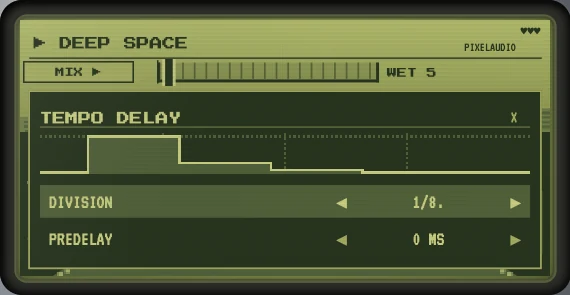
- In TEMPO DELAY, one bar of the host tempo with the real echoes and the predelay line.
- WET meter (0-100): the tail's real level.
- Status bubble: DRY, ROOM, HALL, ARENA, HORIZON!
QUICK TIPS
- 1On vocals, 20-40% is usually enough. Use Low cut in FILTER so the reverb doesn't muddy the lows.
- 2Telephone is the classic radio effect, great for intros or bridges.
- 3A 20-40 ms PREDELAY lifts the vocal off its reverb and keeps it up front.
KNOB: SPACE


Single knob: Space (0-100%). It moves the dry/wet mix, room size, tail brightness, delay repeats and how much delay comes in, all at once. At 0% the signal passes untouched. 100% is big but not infinite, and the delay never self-oscillates.
ADVANCED MODEControls, menus and parameters, for when you want to go past the knob.
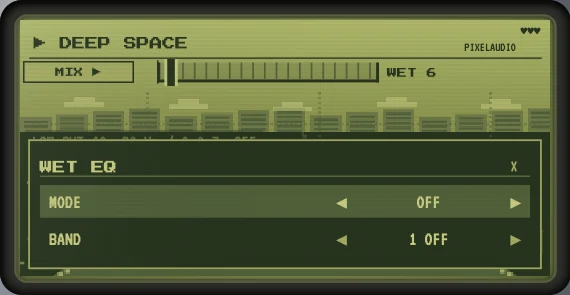
| FILTER button | WET EQ panel. MODE row: effect filter Off (default), Low cut, Telephone, High cut (fixed band 450 Hz - 2.5 kHz; the button abbreviates them OFF / LO / TEL / HI). BAND row: the EQ band selected on the screen. |
|---|---|
| 8-band EQ (on screen) | Acts on the effect, not on the dry signal. Drag a node = frequency and gain (±15 dB), wheel = Q, double-click = reset, right-click = ON / type / reset menu. Types: Low Cut 48, Low Cut 12, Low Shelf, Bell, Notch, High Shelf, High Cut 12, High Cut 48. |
| SYNC button | TEMPO DELAY panel. DIVISION: 1/4, 1/4., 1/4T, 1/8, 1/8. (default), 1/8T, 1/16, 1/16., 1/16T. PREDELAY: 0-250 ms before the reverb tail. |
| WET MIX tab (on screen) | REVERB and DELAY (level of each), DECAY (tail length, 25-300%), FEEDBACK (delay repeats, 0-150%) and the BASS A/B switch (B = shorter low end in the tail). 100% = the approved sound. |
▶ FREE TRIAL · 14 DAYS
The PixelSpace trial isn't out yet. Leave your email and we'll write the day it ships, with the download link.
By continuing you accept the Terms and the Privacy Policy (in Spanish).
We only use your email to tell you about the launch.
Want a heads-up when the trial ships? Drop your email below.