Vocals
Vocal tuning on one knob: from natural and invisible to trap autotune.
KNOB: TUNE
WHAT IT DOES
PixelPitch tunes your voice in real time without touching speeds, vibratos or humanizers. Pick your song's key and scale, turn Tune and you're done: low, the correction goes unnoticed; high, you get the hard T-Pain and urban reggaeton effect. A pixel-art screen shows you, with your real voice, how much is being corrected.
WHAT IT'S FOR
- Tune a lead vocal take without setting anything up.
- The "hard-tune" effect of trap, reggaeton and dembow (knob up).
- Soft, transparent correction for pop, ballads or R&B (knob down).
- Rescue out-of-tune backing vocals and doubles before stacking them (for example, with PixelStack).
- A creative robotic effect on a vocal sample.
HEAR IT
AUDIO ON THE WAY
Soon you'll be able to hear PixelPitch before and after, with real audio.
WHAT THE SCREEN SHOWS
- PITCH QUEST scene: the chibi walks across a landscape. The two background waves come from the DSP: the back one is what you sing, the front one is what the plugin corrects. They meet when the voice is in tune and split when it drifts. The wavelength follows the detected note and the height follows the input level. They appear when you touch the controls and fade after a few seconds.
- Tuning meter in cents (-50 to +50) with the voice's real deviation. It shows "--" when there's no pitched voice to read.
- Status bubble: PITCH QUEST, ALIGNING, TUNED!, SNAP LOCK, PERFECT PITCH.
QUICK TIPS
- 1Set KEY and SCALE right: the plugin only moves the voice to notes in that scale. If you don't know the key, use Chromatic.
- 2Between 30% and 60% sounds natural on most voices; above 80% the robotic effect kicks in.
- 3Use it on a solo, dry voice (no reverb before it) so the detector reads better.
KNOB: TUNE


Single knob: Tune (0-100%). Inside, it moves three things at once: correction speed (260 ms → 2 ms), humanize (70% → 0%) and natural vibrato (80% → 0%). Low, the voice settles calmly and keeps its vibrato. High, the note jumps straight to the nearest one in the scale and stays "locked". The readout under the knob shows the speed in ms (500 ms at 0% → 0 ms at 100%).
ADVANCED MODEControls, menus and parameters, for when you want to go past the knob.
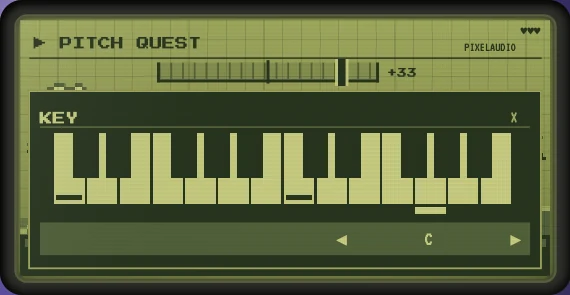
| KEY button | Opens the KEY panel on the screen. Root: C (default), C#/Db, D, D#/Eb, E, F, F#/Gb, G, G#/Ab, A, A#/Bb, B. |
|---|---|
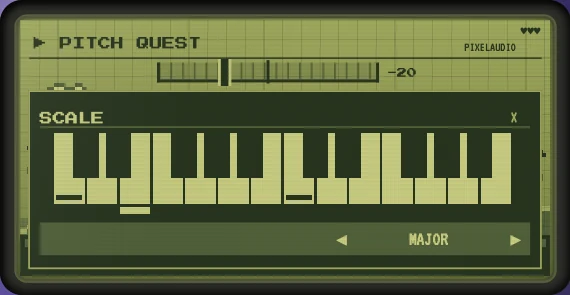
| SCALE button | Opens the SCALE panel with a keyboard marking the scale's notes. Options: Chromatic, Major (default), Minor, Major Pentatonic, Minor Pentatonic, Harmonic Minor, Melodic Minor, Dorian, Phrygian, Lydian, Mixolydian, Locrian, Blues. |
▶ FREE TRIAL · 14 DAYS
The PixelPitch trial isn't out yet. Leave your email and we'll write the day it ships, with the download link.
By continuing you accept the Terms and the Privacy Policy (in Spanish).
We only use your email to tell you about the launch.
Want a heads-up when the trial ships? Drop your email below.